An Agentic AI pilot rarely fails in development. More often, it stalls in production, when the monthly bill arrives.
Enterprises have become adept at managing the cost of generative AI while they build. On the Karini AI platform, teams compare models in the Model Hub to select the best price-to-performance for each task, optimize agents during design to reduce token consumption, and generate fine-tuning datasets to distill larger workflows onto smaller, more economical language models (SLMs). At build time, cost is largely a design decision, and the platform gives teams the tools to optimize the cost.
Production is a different environment. Once a workflow is live and adopted, spend is no longer determined by a single design choice. It becomes a function of real usage: traffic volumes that are hard to forecast, agents that occasionally loop more than expected, a misconfigured recipe, or a team running a large evaluation. Costs that looked predictable in testing can move quickly, and the first clear signal often arrives on the invoice.
Faced with that uncertainty, technology and finance leaders tend to respond by tightening budgets and slowing rollouts. The concern is rarely the value of the technology; it is the difficulty of approving spending that cannot be predicted or attributed with confidence. The practical effect is a drag on innovation, with promising initiatives held back alongside the ones that genuinely need rethinking.
The question we set out to answer was straightforward: what if spend could be governed as it occurs, priced accurately and attributed to the specific recipe, copilot, or user responsible, rather than reconciled weeks later?
Launching Budgets & Controls
Today we are introducing Budgets & Controls on the Karini AI platform. It extends the cost discipline teams already apply during development into production, enforcing spend budgets and rate limits as each call is made, across every model type, and scoped to a clear hierarchy of organization, recipe, copilot, and user.
Because enforcement lives in the platform middleware (the layer every request already passes through), it applies to existing recipes, agents, and copilots without any code changes. Teams opt in, define their limits, and the platform tracks usage against them continuously. Budgeting is off by default, so adoption is deliberate and fully under your control.
For technology and finance leaders, the value is simple to state: the limits you set are the limits that hold, and cost predictability no longer has to come at the expense of continued investment.
How It Works
You define how much a given scope may spend within a given window, and the platform enforces it. Limits are set per calendar window (hourly, daily, weekly, or monthly), aligned to real clock boundaries, so a window resets when you would expect. Scopes nest sensibly: when a copilot performs the work, the platform also charges the spend towards the underlying recipe, so you see one coherent figure.
Those budgets are trustworthy because the accounting beneath them is exact. Every call is priced at the moment it is made, using the rates configured for that endpoint, and each usage record stores the prices it applied. The ledger is effectively self-auditing: if you ask why a request cost what it did, the answer is in the record.
| Capability | What it does |
|---|---|
| Scope hierarchy | Budgets at organization, user, recipe, and copilot level. |
| Calendar windows | Hourly, daily, weekly, and monthly limits aligned to real clock boundaries, so windows reset predictably. |
| Token-level metering | LLMs priced per input and output token (including cache reads, cache creation, and reasoning tokens); embeddings per input token; rerankers per search unit; guardrails per policy, per unit of text. |
| Enforcement | When a scope reaches its cap, the request is blocked rather than allowed to continue. The response names what was capped and includes a Retry-After signal indicating when the window resets. |
| Rate limits | Requests-per-minute and maximum-concurrency caps, recipe-run quotas by window, and per-node rate limiting within graph execution. |
| Fail-open design | If the metering layer cannot reach its backend, a scope is not identified, or budgeting is disabled, requests continue to flow. Telemetry never breaks a model call. |
| Live headers | Every allowed response returns the current spend and limit for the window, so a client can display running usage without an additional API call. |
Together, budgets and rate limits provide two complementary controls: how much can be spent, and how quickly it can be requested.
Architecture
Budgets & Controls sits at the middleware boundary, ahead of execution. A request carrying scope information passes through two gates before any model is called: a rate-limit gate and a budget gate, both of which fail open. Execution then runs the workflow, and every LLM, embedding, reranker, and guardrail call is priced, charged against a running-spend counter, and written to a durable time-series ledger through a batched, asynchronous sink.
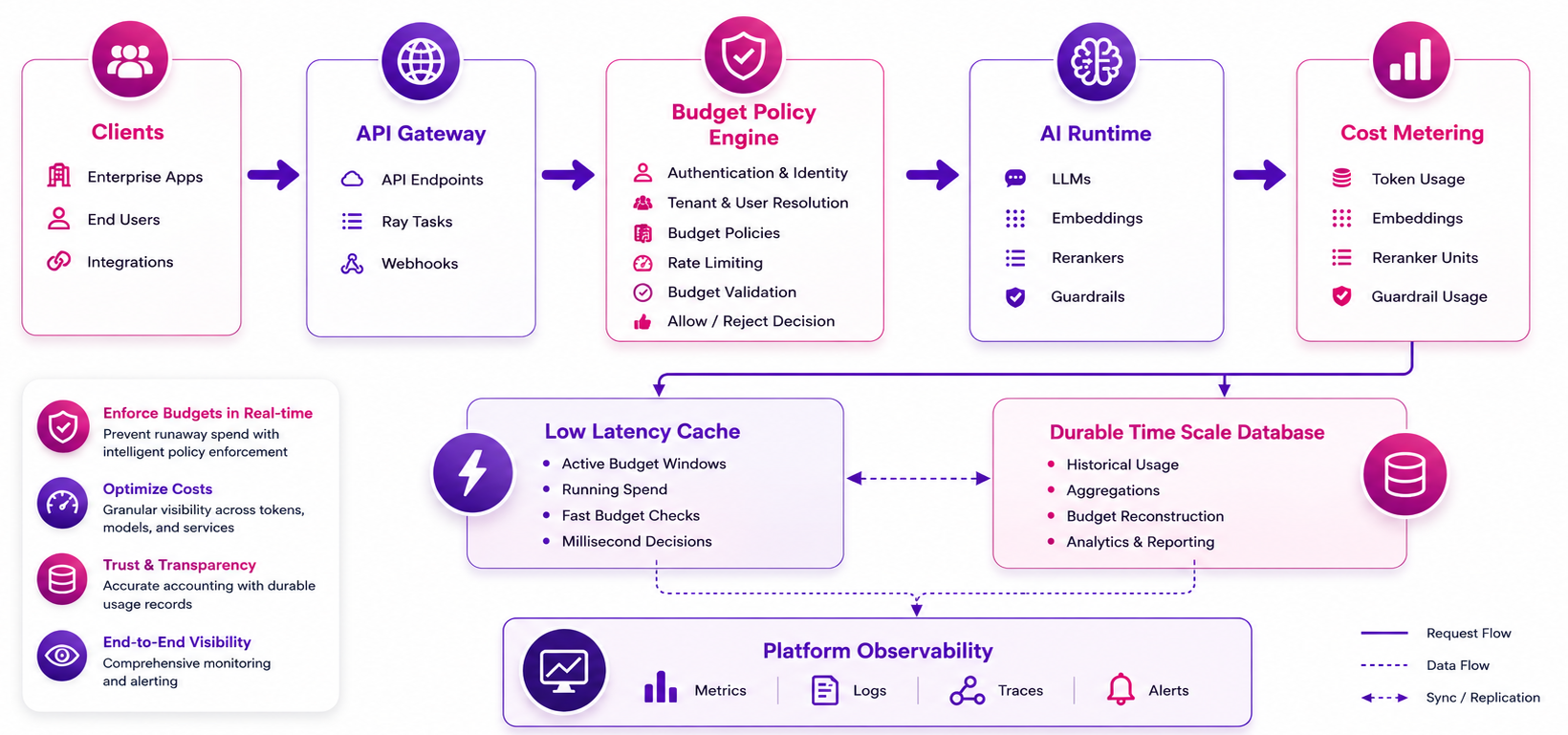
That single ledger supports three things at once: the limits the budget gate enforces, the response headers clients read for live spend, and the dashboards teams use to monitor usage. Running-spend counters are rebuilt from the durable ledger when needed, and a health endpoint reports metering and sink status, so the accounting layer remains observable without ever sitting in the critical path of a model call.
Setting It Up in Your Organization
Budgets & Controls is configured from a single Budgeting Limits panel at the organization level. You set daily and monthly caps for the organization as a whole, then add more granular limits per recipe, per copilot, and per user role, each with its own independent enable control.
The design principle is to impose a default, then override where needed. Begin with an organization ceiling (the figure nothing may exceed), and tune the scopes beneath it to match how each workload actually behaves:
- Override per user role. An administrator running evaluations needs more headroom than a lightweight copilot user. Set distinct daily and monthly limits for each role, toggled on or off independently.
- Override per recipe or copilot. A high-volume retrieval pipeline or a customer-facing copilot can carry its own allowance, separate from the default. Raise it for a launch or lower it for a pilot: a configuration change, not a redeployment.
- Leave a scope uncapped. Disable a limit where you want unbounded throughput, with the organization ceiling remaining the backstop.
- Author the message. Configure exactly what a user or system sees when a budget or rate limit is reached, so the response is clear and actionable.
The intent is control without rigidity: you set the policy, and you keep the flexibility to adjust it.
Understanding the Dashboards
Every priced call flows into a durable, time-series usage ledger, written asynchronously so accounting never slows the work. Each record carries the model type, the cost, and the identity behind it, which turns a recurring question ("how are we spending?") into a live, filterable view.
Organization view. Daily spend is charted against the organization budget line, with total, average, and peak-day figures across the selected window.
Users view. The same window resolves by identity, with spend for each role plotted against its budget line, so a single heavy user is easy to spot.
Month-to-date view. Every user is ranked against their cap, with percentage-of-cap at a glance and a clear count of how many need attention.
On every allowed request, the platform also returns the current spend and limit for the window in the response headers, so any client can show running usage without a separate call.
Benefits
Budgets & Controls is built for the operational reality of teams that need to scale agentic workloads without asking finance for an open-ended commitment.
| Benefit | Impact |
|---|---|
| Predictable spend | Live limits mean the ceiling you approve is the ceiling that holds, reducing month-end surprises and runaway usage that only surfaces on the invoice. |
| Innovation without the freeze | Because spend is governed rather than estimated, leaders can approve more projects with confidence. Guardrails replace hard stops. |
| Granular accountability | Cost is attributed to the specific organization, recipe, copilot, or user responsible, so optimization effort is directed where spend actually accrues. |
| Flexible governance | Impose a ceiling, then override per role, recipe, or copilot as workloads require: policy that adapts where it should and holds where it must. |
| Accurate accounting | Precise pricing across LLMs, embeddings, rerankers, and guardrails, including cache and reasoning tokens, backed by a self-auditing ledger. |
| Cost and volume control | Budgets cap spend while rate limits cap throughput, protecting both the bill and the backend from bursts. |
| Low-disruption rollout | Middleware enforcement requires no changes to recipes, agents, or copilots, and fail-open behavior means governance never threatens uptime. |
| Live visibility | Dashboards and response headers make spending a real-time signal teams can act on, rather than a lagging report. |
From Build-Time Savings to Runtime Control
For much of the past three years, cost in enterprise AI has been treated as something you engineer once (choose the right model, tighten the agent, distill to a smaller model) and then hope holds up in production. That approach was reasonable when generative AI lived mainly in pilots. It is harder to sustain once workflows meet real traffic.
Karini AI already provides the build-time levers: model comparison, agent optimization, and fine-tuning datasets to reduce model size and cost. Budgets & Controls completes the picture, extending that discipline into production with token-level budgets, a clear scope hierarchy you can impose and override, rate limits, and live dashboards, all enforced in middleware and fail-open by design.
The result is what most teams are looking for, and what most finance leaders need: the confidence to keep building, knowing that spend is governed from the first experiment to the millionth production call.
Budgets & Controls is available today on the Karini AI platform.
FAQ: Budgets, Rate Limits, and LLM Cost Governance
What are Budgets & Controls in Karini AI?
Budgets & Controls is a cost-governance capability that enforces spend limits and rate limits on generative AI workloads in production. It prices every model call and blocks requests that would exceed a configured budget, across organization, user, recipe, and copilot scopes.
How is this different from managing cost during development?
Build-time tools such as model comparison, agent optimization, and SLM fine-tuning reduce the cost of a workflow before it ships. Budgets & Controls governs cost after it ships, when real usage drives spend. The two are complementary: one lowers unit cost, the other caps total spend.
What scopes can I set budgets for?
Organization, user, recipe, and copilot. The organization cap is the ceiling; recipe, copilot, and user-role limits nest beneath it, and nested accounting avoids double-charging.
Can limits be overridden for a specific user, recipe, or copilot?
Yes. You impose a default and override it where needed. Per-role, per-recipe, and per-copilot limits can each be raised, lowered, or disabled independently, while the organization ceiling remains the backstop.
What time windows do budgets support?
Hourly, daily, weekly, and monthly, aligned to real calendar boundaries so windows reset predictably.
How is usage priced?
LLMs are priced per input and output token, including cache reads, cache creation, and reasoning tokens. Embeddings are priced per input token, rerankers per search unit, and guardrails per policy per unit of text. Pricing is applied at the time of the call, and each record stores the rates it used.
What happens when a budget is reached?
The request is blocked rather than allowed to run up the bill. The response names what was capped and includes a Retry-After signal indicating when the window resets. The message shown can be customized.
Will cost controls affect production if the metering backend fails?
No. Budgeting is fail-open. If the metering layer cannot reach its backend, a scope is not identified, or budgeting is disabled, requests continue to flow, and telemetry never breaks a model call.
Do I need to change my recipes or agents to use this?
No. Enforcement is handled in the platform middleware, so it applies to existing recipes, copilots, and agents without code changes. Budgeting is off by default and enabled explicitly.
How do I monitor spend?
Budgeting dashboards provide organization, users, and month-to-date views, with spend charted against budget lines and per-user status. Allowed responses also return current spend and limit in their headers.