TL;DR: Agent Skills are packaged agent capabilities. Each skill is a folder with a SKILL.md file containing instructions, plus optional scripts, assets, references, examples, and sub-agent roles. On the Karini AI platform, skills with scripts execute in the agent's live sandbox rather than only instructing the model. Sixteen skills ship natively. Skills are granted per agent, inspectable before enablement, recorded in run traces, and versioned with the agent so a rollback restores the exact capability set that was live.
An agent rarely fails because the model is not smart enough.
It fails because everything the agent needs to know has been packed into a single prompt.
You know the pattern. The agent starts focused: read the ticket, look up the account, draft the reply. Then someone asks for the summary as a PowerPoint. Another team needs the same data as an invoice. A third wants the analysis pushed to Postgres. Every request lands as another paragraph in the prompt, until the prompt is the only place any capability actually lives.
At first this works. Then the bill comes due, quietly.
Your context window fills with instructions that have nothing to do with the task at hand, and you pay for those tokens on every call. The agent rewrites the same brittle code on each run, so the deck that rendered perfectly last Tuesday comes out broken today. Sharing a capability across a team means copy and paste, so the fix you made in one agent never reaches the other four.
And because none of it is versioned apart from the prompt, you have no clean answer when someone in compliance asks the obvious question: what was this agent actually able to do on the day it produced that output?
A prompt was never meant to be a capability management system.
Software engineering solved a version of this a long time ago. Package the capability once, with its instructions and its working code. Give it a name and a clear description of when to use it. Grant it to the agents that need it and to no others. Version it, ship it, roll it back when something breaks.
That is what a skill is.
Agent Skills is live
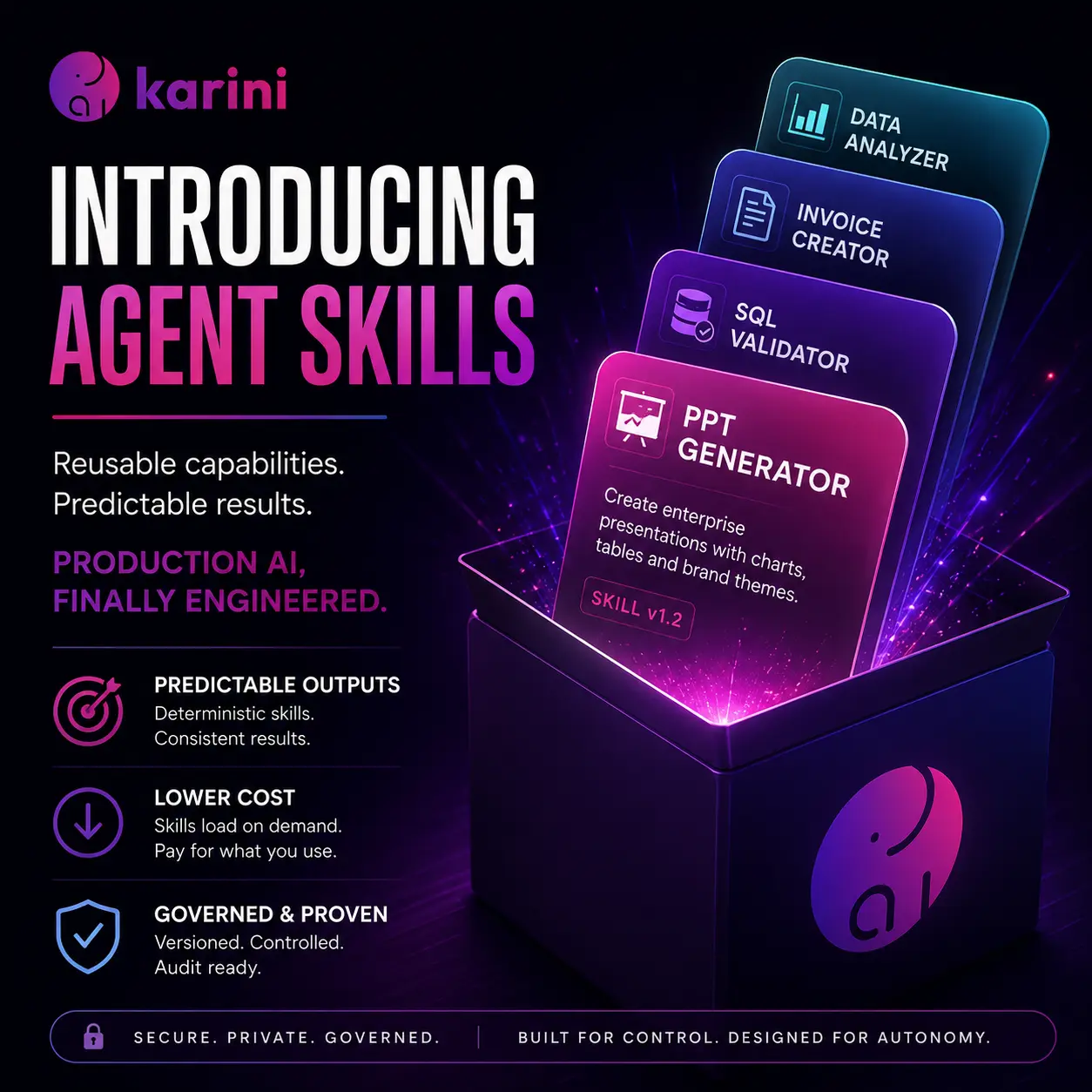
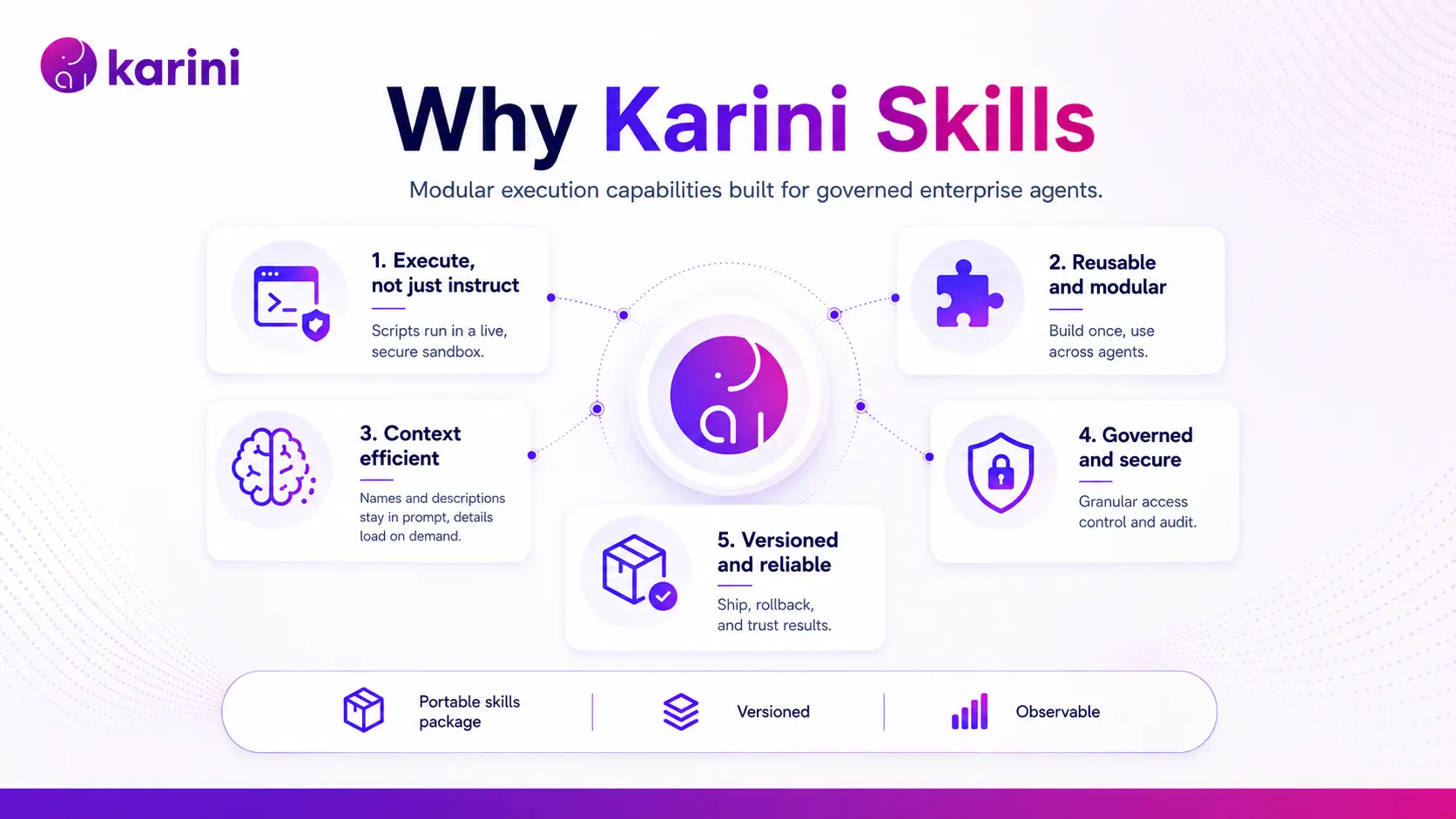
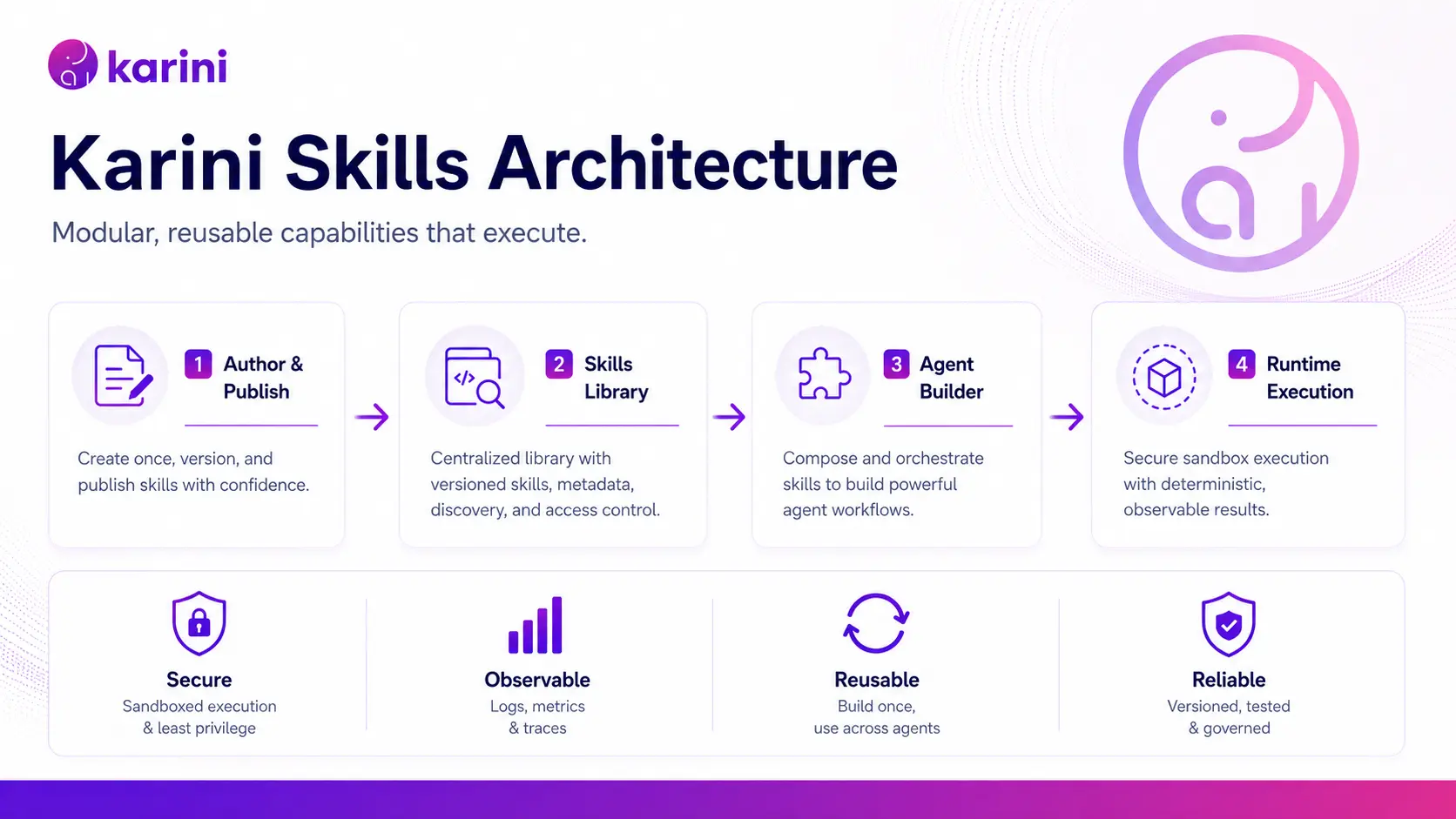
Agent Skills are portable packages of instructions, scripts, and resources that give AI agents specialized capabilities and domain expertise. Agent Skills are available today on the Karini AI platform for Agents and Deep Agents. Sixteen skills ship out of the box. Your teams can author or upload their own. Every agent receives only the skills its builder grants it, and skills are versioned and published alongside the agent that uses them.
Three things change the day you turn them on.
Your outputs get predictable. Deterministic work runs on tested code instead of being reinvented by the model every time. Rendering a deck, validating SQL, laying out an invoice: same result every run. The model spends its reasoning on the part of the problem that actually requires judgment.
Your context bill drops. An enabled skill costs a name, a description, and a file location in the prompt. The full instructions load only when the skill fires. Ten skills cost you about ten sentences, not ten documents.
You can prove what an agent could do. Skills are granted per agent, readable in full before you enable them, recorded in the run trace when they are used, and versioned with the agent so a rollback restores the exact capability set that was live.
What is inside a skill
A skill is a folder with a SKILL.md file at its root: YAML frontmatter declaring a name and description, then a markdown body of instructions. The format follows the Agent Skills specification, so a skill written to the spec travels with you rather than locking you to one vendor.
| Folder | What it holds |
|---|---|
SKILL.md | Required. The instructions, plus the description that tells the agent when to reach for this skill. |
scripts/ | Executable helpers the agent runs inside its sandbox. |
assets/ | Templates, images, themes. |
references/ | Deep documentation, read on demand. |
examples/ | Sample briefs and data. |
agents/ | Role prompts for sub-roles inside the skill. |
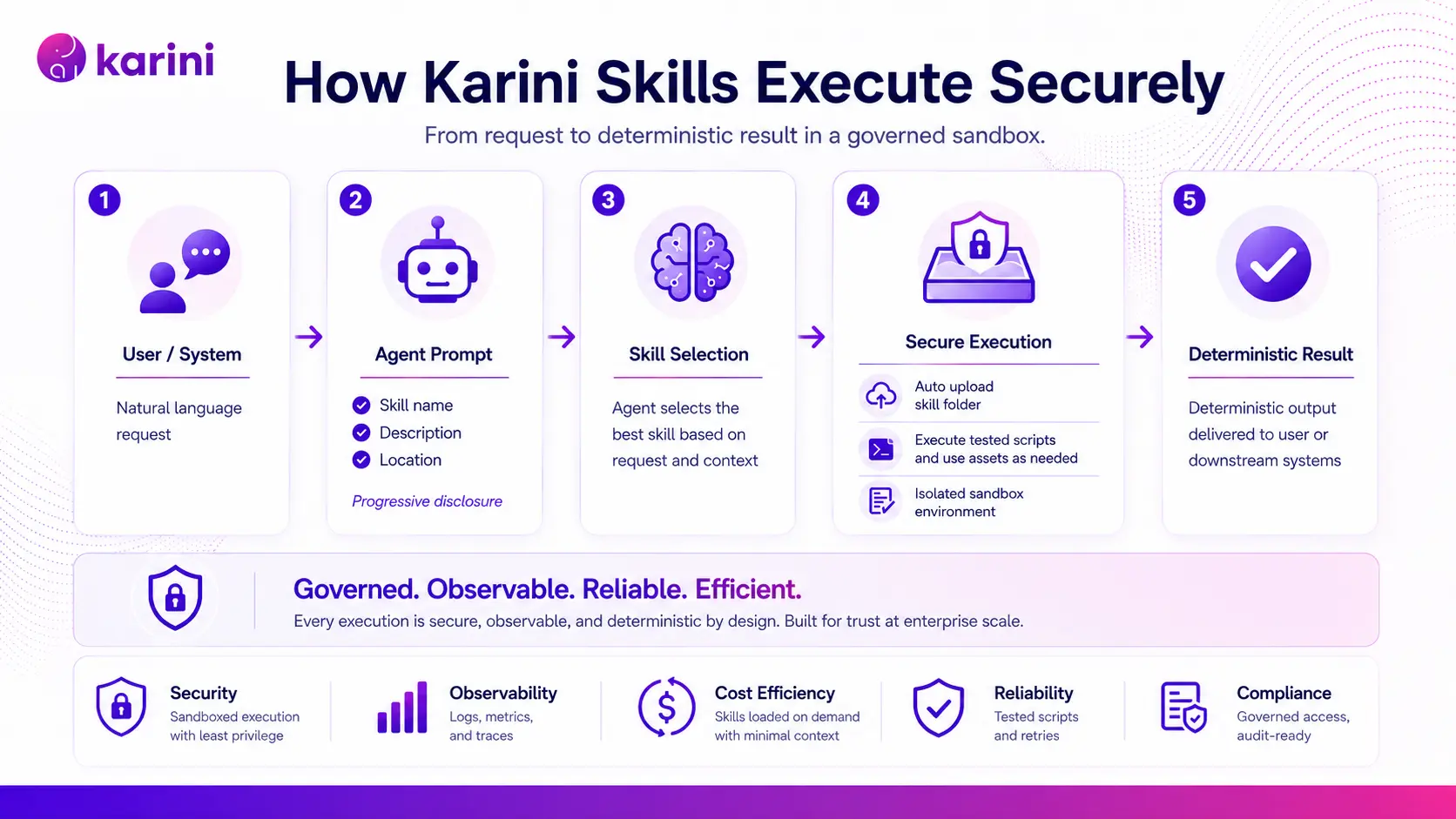
The idea underneath all of it is progressive disclosure. The system prompt carries the name, the description, and where to find the skill. Nothing more. Everything else is read from disk at the moment it is needed, and the reference guides tucked inside a skill cost you nothing until the agent actually opens one.
Our skills execute. They do not just instruct.
This is the part worth being blunt about. Many skill implementations today are a markdown file and good intentions.
When a skill on Karini AI carries a scripts folder, we upload those files into the agent's live sandbox before it runs. The agent calls a tested helper instead of writing the library call from memory:
python /tmp/skills/ppt-generator/scripts/create_presentation.py
The system prompt tells the agent, in so many words, to prefer the script that already exists over deriving a new one. The upload is idempotent per session, so a fresh sandbox gets everything it needs while a reused one only picks up what changed since the last turn.
This matters because not every part of an agentic workflow should be probabilistic. The model should decide what belongs in a presentation and how to make the argument. It should not have to reinvent the mechanics of rendering that presentation on every request.
Let the model handle judgment. Let tested code handle repeatable execution.
What you can do on day one
Sixteen skills ship native. Fourteen are yours to select. Two run always and stay out of the catalog: file-link makes sure every saved file comes back to the user as a download link, and interrupt-request gives the agent a structured way to escalate to a human instead of inventing a tool call it was never given.
Here is what the other fourteen buy you before anyone writes a line of anything.
Turn a brief into a branded deck. ppt-generator is the clearest example of how much depth fits in this format. It carries four helper scripts, four reference guides covering design principles, layout patterns, brand adaptation, and chart guidelines, four internal agent roles including a deck planner, slide designer, content compressor, and QA reviewer, plus a set of theme assets. It is a small production pipeline you can grant with one click.
Catch bad SQL before it reaches a database. text-to-sql handles eight dialects, including Postgres, MySQL, SQLite, BigQuery, Snowflake, Redshift, T-SQL, and Spark. It ships with a DuckDB and sqlparser validator that parse-checks generated SQL without connecting to anything.
Produce business documents that follow your rules. invoice-generator handles line items, tax, and payment terms. resume-generator outputs ATS-friendly PDF, DOCX, and HTML. email-generator does plain text or styled HTML.
Deliver in whatever format the business asks for. PDF, DOCX, PPTX, XLSX, HTML, Markdown, CSV, JSON, YAML, and charts as PNG, SVG, or interactive HTML.
Encode the way your company already works
Native skills get you moving. But most of the value sitting inside an enterprise is not generic.
It is the approved template. The brand standard. The analytical method your team trusts. The compliance rule that has to hold every time. The standard operating procedure that lives in one person's head and gets explained again every quarter.
Agent Skills give you somewhere to put that.
Builders can upload a skill or write one directly in the Skills tab of the prompt playground, using a markdown editor with fullscreen expand and live preview. Names are checked against your organization for duplicates before anything saves. Behind that tab is a full CRUD API with multipart upload into scripts, assets, references, examples, and agents, so a skill your team writes can carry exactly as much executable depth as one of ours. The same library is available to Kai, our spec-driven agent builder, when it assembles a workflow for you.
A company could build a skill that applies its brand and messaging standards to every deck, produces account plans using its own sales methodology, reviews contracts against an approved legal playbook, drafts customer communications in its own voice, or validates analytics output against internal data quality rules.
Write the capability once. Grant it to every agent that needs it. Improve it once and the improvement is available everywhere, on a deliberate republish.
Read it before you trust it
Every native skill opens for inspection before you enable it. The file browser gives you a navigable folder tree with breadcrumbs, markdown rendered with a Preview and Raw toggle, raw view for scripts, and inline preview for image assets.
So before you grant ppt-generator to an agent, you can read the instructions it will follow, the Python it will execute, the reference guides it will consult, and the theme images it will apply.
If you have ever taken an agent platform through a security review, you know that is worth more than a feature list. The capability is legible before you hand it over.
And it does not stop at design time. Skill read events are captured in the platform's observability and run traces, so a run trace shows which skills the agent actually opened, and when.
Inspection tells you what an agent is able to do. The trace tells you what it did.
Governance, the short version
Skills put executable content inside a multi-tenant platform, which raises the questions any enterprise architect should ask. Here is how we answer them.
Least privilege is the default, not a setting. Each agent carries its own skills list. There is no all-skills fallback, and an empty selection means zero skills. Filtering applies to directory listing, glob, and skill discovery, not just the system prompt, so an agent does not surface capabilities its builder never granted.
Sub-agents inherit additively. A sub-agent sees the parent Deep Agent's skills plus whatever it is configured with, and its scripts land in the shared sandbox so an inherited skill does not fail at execution time.
Tenants stay isolated. Custom skills live under an organization-scoped, version-scoped path and mount read-only at runtime. Two published versions of the same agent can carry genuinely different content under the same skill name without touching each other. Native skills cannot be deleted, and a custom skill cannot shadow one by reusing its name. The platform this runs on is SOC 2 Type II attested, and skill execution is governed by the same token budgets and rate limits as every other call an agent makes.
Publishing is versioned and transactional. On publish, each attached skill is snapshotted into a version record tied to the prompt version. Promote an earlier version and that version's skill content comes back with it. Edit a skill and the current version clears, which forces a deliberate republish so nothing shifts under a running agent.
Skills travel with the recipe. Export bundles your custom skill documents with the deep-agent prompts. Import recreates them in the target organization, remaps the references, and rebuilds the attachment set. A shared agent recipe arrives intact instead of arriving broken.
Reviewers can see it on the canvas. Skills render as their own node type, laid out beneath the agent that owns them, with a click-through into the playground at that skill and version. Open a recipe and you can see at a glance what every agent in the workflow was given.
Watch it run
Native skill to finished PDF. Open the catalog, read through pdf-generator in the file browser before enabling it, grant it to an Agent with one click, then hand the agent an RFP and watch a six-page response come back as a formatted PDF. The thing to notice is what the agent never does. It never writes PDF generation code, because it calls the script instead, and the run trace shows the exact moment it read SKILL.md.
Custom skill for branded email. Open Add new, give the skill a name and a description that says both what it does and when to use it, draft the body with live preview beside you, save it past the duplicate-name check, attach it to an agent, and watch the output come back in your organization's own tone, structure, and formatting.
Composable agents beat monolithic prompts
For a few years now, the answer to making an agent more capable has been to make its prompt longer. That worked well enough through the pilot phase. It does not survive a portfolio of production workflows. Instructions collide. Context costs compound. Capability drifts somewhere past the reach of anyone who has to review it or attest to it.
Agent Skills give you the other pattern. A capability becomes a unit with a name, a description, working code, an owner, and a version history. Builders assemble agents out of those units instead of authoring monoliths. Administrators grant them one at a time and read exactly what they are granting. Platform teams improve a skill once and every agent carrying it inherits the fix.
Sixteen skills ship today, and the format is wide open for whatever your teams write next.
Open the Skills tab in the prompt playground. Inspect a native skill, attach it to an agent, and trace its use in a run.
See Agent Skills on your own agents
Walk through the Skills tab with our team, and we will attach a skill to one of your recipes and trace it end to end in a live run.
Book a demoFAQ: Agent Skills, SKILL.md, and Agent Capability Management
What is an Agent Skill?
An Agent Skill is a folder containing a SKILL.md file with YAML frontmatter and a markdown body of instructions, optionally carrying scripts, assets, reference documents, examples, and internal agent roles. It follows the Agent Skills specification.
How is a skill different from a tool?
A tool is a function the agent calls. A skill is a packaged capability: instructions for how and when to do something, plus executable code where it makes sense. The two are complementary, and skills appear as their own node type on the Karini AI recipe canvas.
Do skills actually run code?
Yes. When a skill contains a scripts folder, those files are uploaded into the agent's live sandbox before execution, and the agent is instructed to prefer the packaged script over writing its own. The upload is idempotent per session, so a fresh sandbox receives everything it needs while a reused sandbox receives only what changed since the previous turn.
How many skills ship by default?
Sixteen. Fourteen are user-selectable and cover document generation, business deliverables, charts, and text-to-SQL across eight dialects including Postgres, MySQL, SQLite, BigQuery, Snowflake, Redshift, T-SQL, and Spark. Two run always: one returns saved files as download links, and the other provides structured human-in-the-loop escalation.
Can we write our own skills?
Yes. Upload a .md file or author one directly in the Skills tab of the prompt playground using a markdown editor with fullscreen expand and live preview. Full CRUD is available over the skills API, including multipart upload into the scripts, assets, references, examples, and agents folders, so a custom skill can carry the same executable depth as a native one.
Can I see what a skill does before I enable it?
Yes. Every native skill opens in the skills file browser, with a navigable folder tree, markdown rendered in preview or raw form, raw view for scripts, and inline preview for image assets. Before granting a skill to an agent, you can read the instructions it will follow, the code it will execute, the reference guides it will consult, and the assets it will apply.
Can we see which skills an agent used on a run?
Yes. Skill read events are part of the Karini AI platform's observability, so the run trace records which skills the agent opened during execution and when. Inspection tells you what an agent is able to do, and the trace tells you what it did.
How do we control which agents get which skills?
Skills are granted per agent. There is no implicit all-skills fallback, and an empty selection means zero skills. Filtering applies to directory listing, glob, and skill discovery as well as the system prompt, so an agent does not surface capabilities its builder never granted. Creating, updating, and deleting custom skills is gated by role.
Do sub-agents inherit skills?
Yes, additively. A sub-agent sees a parent Deep Agent's skills plus its own configured skills, and sub-agent scripts are uploaded to the shared sandbox so an inherited skill does not fail at execution time. The agent-as-a-tool path resolves skills the same way.
Do skills consume a lot of context?
No. The system prompt carries only the name, description, and location of each enabled skill. Full instructions are read from disk on demand, and the injected catalog is character-budgeted so a large library degrades gracefully instead of crowding out the agent's actual instructions. Ten enabled skills cost roughly ten sentences of context rather than ten documents.
How are skills versioned, and can we roll back?
Skills are versioned alongside the agent version. On publish, each attached skill is snapshotted into a version record tied to the prompt version. Promoting an earlier version restores that version's skill content and overwrites the attachment set. Any skill edit clears the current version, forcing a deliberate republish so nothing changes under a running agent silently.
Do skills travel when a recipe is exported or shared?
Yes. Export bundles custom skill documents with the deep-agent prompts, and import recreates them in the target organization, remapping references by both original identifier and name before rebuilding the attachment array and skill versions. A shared or exported recipe arrives with its custom skills intact rather than with broken references.